






Apollo's Templates
HomeCalendarsAcademic / School Year Calendar
Calendars

Academic Calendar Template 2026-2027

A free academic calendar that carries your school’s actual dates — enter the first and last day, breaks and exam weeks once, and get a 12-month fillable planner plus a one-page year-at-a-glance with every date printed where it belongs. US holidays are marked automatically, correctly across the year boundary.

Academic year planner

A school-year planner with your school's dates on it.

Enter your school's key dates — first and last day, breaks, exam weeks, teacher work days — and generate a planner that carries them: 12 fillable monthly pages, a one-page year at a glance, or both. US holidays are marked automatically.
My school dates — any dates and labels you like: first/last day, breaks, exam weeks, teacher in-service days (printed on the calendar)
13-page PDF · US Letter · fillable day boxes · your dates printed
Sample output
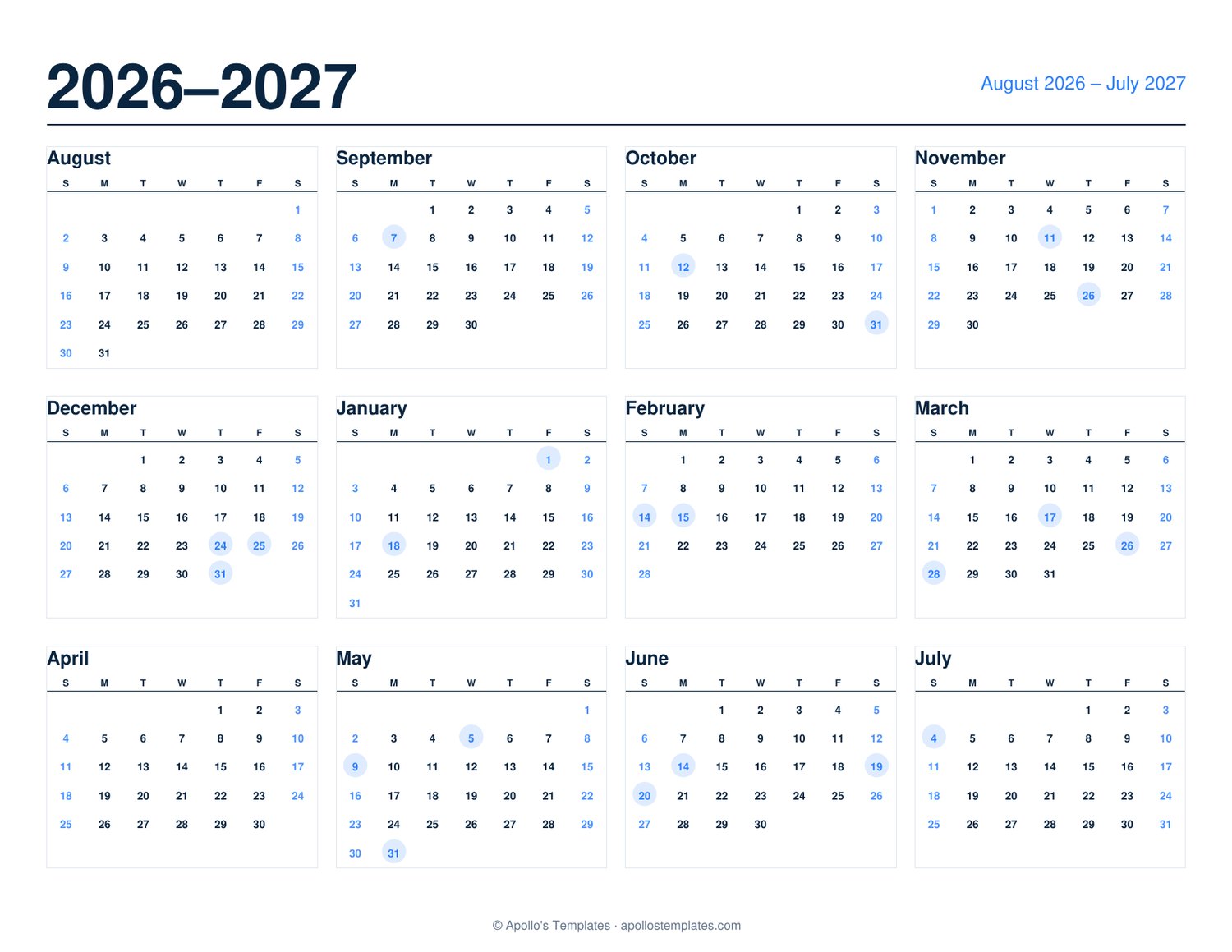
Academic year calendar from August 2026 to July 2027, twelve month grids on one page with holidays shaded
Sample shows August 2026 through July 2027. Set your own start month and year above. The generator above builds yours from the options you choose.

School year calendar 2026-2027 — August to July on one page

Choose the start month (August by default; September, July or any month works) and the calendar lays out twelve months across the two calendar years. Add your school's first and last days, breaks, exam weeks and events and they print in place — a school calendar that matches your district, not a generic one.

Academic planner, homeschool and teacher use

Print it for the classroom wall or the front of a planner. Teachers pair it with the lesson plan template; homeschoolers with the homeschool planner; and for a plain calendar-year version there's the year at a glance. Free fillable PDF — no Excel or Word file needed.

Tips for the best result

Grab your district's calendar first. Your school or district publishes its key dates each spring — have that page open, copy in the first/last day, breaks and early-release days, then generate. Two minutes of typing gives you a planner that matches your actual year.

Use the fillable boxes for the recurring stuff. Picture day, spirit weeks, report-card windows, practice schedules — type them into the monthly pages before printing and they're on every copy.

Make one per kid. Different schools, different calendars — generate each child's planner with their school's dates and name on it.

Both formats work together. Year-at-a-glance on the wall for the big picture; monthly pages in the binder for the details.

For weekly lesson planning
Teacher Lesson Planner
Weekly grid — class periods down, days across. The day-by-day layer under this year planner.
Open
For homeschool families
Homeschool Weekly Planner
Subjects down, days across — pair with the academic planner for full-year curriculum planning.
Open

Frequently asked questions

How do I get MY school's dates onto the calendar?
Use the “My school dates” rows: pick a date, type a label (First day of school, Winter break begins, Finals week, Teacher work day…), and add as many as you need. Every date you enter is printed on the monthly planner pages and circled on the year-at-a-glance. Your school or district publishes these dates on its website — copy them in once and every printout carries them.
What's the difference between the monthly planner and the year at a glance?
The monthly planner is 12 full pages, one month each, with a fillable box under every day — type events on your computer or write them in after printing. The year at a glance is one landscape page with all 12 mini-months for the wall or the front of a binder. Generate either one, or both in a single PDF (the glance page prints first, the planner follows).
Should my year start in August or September?
Most US K-12 schools and many universities start mid-to-late August, so August → July is the default. Some universities (especially in the Northeast) start after Labor Day and prefer September → August; year-round schools sometimes use July. The First month dropdown supports any start.
Are semester and term boundaries marked automatically?
No — because they genuinely vary by district and institution, and a wrong guess is worse than none. Instead, enter your own term boundaries as school dates (“Semester 2 begins”, “Q3 ends”) and they print exactly where your school puts them. US federal holidays ARE marked automatically, correctly across the year boundary.
Can I put my school or class name on it?
Yes — the optional School / class name field prints as the title of the year-at-a-glance page and in the PDF's document title. Handy for classroom walls, homeschool binders, or making one per child.
Who is this for?
K-12 teachers (classroom calendars and planning), parents tracking school-year logistics, college students mapping semesters, homeschool families (curriculum mapping with their own term structure), administrators, tutors and coaches — anyone whose year runs on school time rather than calendar time.
Is there an Excel or Word academic calendar template?
This generator produces a fillable PDF rather than an Excel or Word file, because it can print your own dates into the grid — something a spreadsheet template makes you do by hand. Open the PDF in any viewer to add more notes, or print it straight away.
Updated through September 2026