Apollo's Templates
HomeBusinessExpense Report TemplatesDaily
One day, one page

Daily Expense Report Template

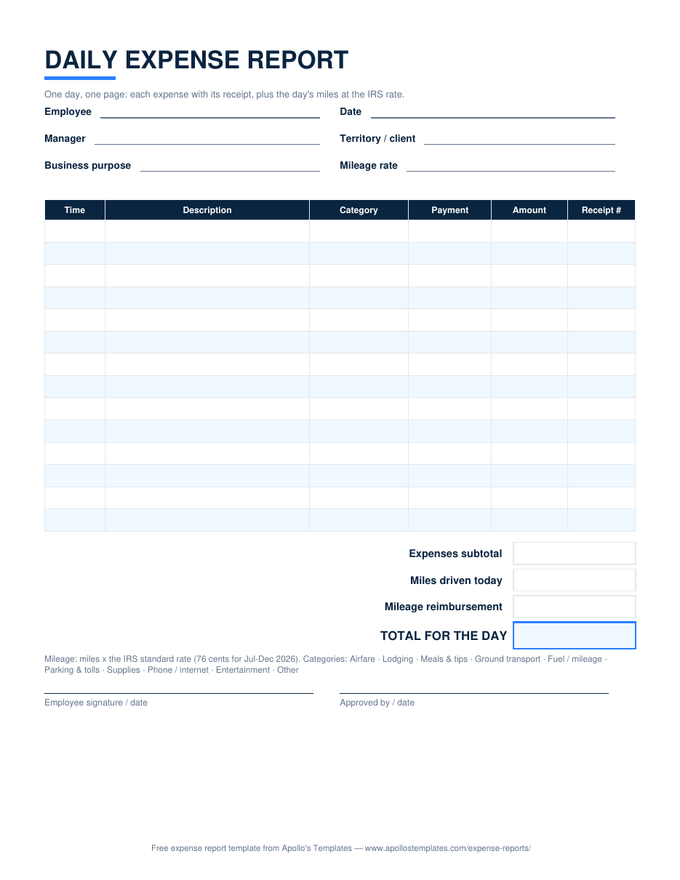
The road-warrior's sheet: everything one working day cost, on one page, with the miles driven at the IRS rate right underneath. Time-stamped rows keep the day in order, receipt numbers match the stack, and the total for the day \u2014 expenses plus mileage reimbursement \u2014 computes as you type. Outside sales, service calls, site visits, conference days: fill one per day and the week's report writes itself.

Three formats

The daily sheet, three ways.

Excel — expenses plus mileage

Twelve time-stamped rows with category and payment dropdowns; a miles line at the prefilled IRS rate; the day's total computes.
Daily expense report with time-stamped expense rows, a receipt column, a miles-driven line at the IRS rate, and the day's total
PDF

Printable PDF

The dashboard version — write it in the parking lot before the next call.
Download PDF

Word (.docx)

Editable for typed daily reports; retype the rate if your company pays a different one.
Worth knowing

Write it before you leave the parking lot.

Daily expense reports exist because memory is the worst expense-tracking system ever devised. The 8:15 parking garage, the toll, the coffee for the prospect — by dinner two of them are gone, by Friday the whole morning is a guess. Five minutes at the end of the day, with the receipts on the passenger seat, produces a report an approver never questions.

Put the day’s business purpose in the header even when it seems obvious. “Client visit — Dallas” on every daily sheet is what makes a year of reports defensible under the IRS’s accountable-plan rules, and it’s the field that reviewers actually read first.

The full mileage record
Mileage Log Template
Odometer readings, computed miles, and reimbursement at the IRS rate.
Open
Roll the days up
Weekly Expense Report
One row per receipt for the week, with the reimbursement total.
Open
One trip, one page
Travel Expense Report
Day rows and category columns for a single trip.
Open

Frequently asked questions

When is a daily expense report the right tool?
When a single day generates enough receipts to lose one — a trade-show day, a route of six client visits, a site walk with tolls, parking, and two meals. The daily sheet keeps the sequence honest with time stamps and gets written while the day is still in memory. Quiet days don't need it; the weekly report absorbs those.
How does the mileage line work?
Type the day's miles and the sheet multiplies by the rate in the header — prefilled with the IRS standard rate, currently 76 cents for the second half of 2026 — and adds it to the expenses subtotal. If your employer reimburses a different rate, retype the rate cell. For a full trip log with odometer readings, use the mileage log template and carry the total here.
Receipt numbers — why bother?
Because a stack of nine receipts and nine rows is only useful if they match. Write 1–9 on the receipts as you get them and put the number in the Receipt # column; the approver can check any row in seconds and you can prove any expense a year later. It's the cheapest audit protection there is.
Can daily sheets roll up into a weekly or monthly report?
That's the intended workflow: the daily sheets are the detail, the weekly or monthly report is the submission. Carry each day's total to one row of the weekly sheet, or the category totals to the monthly summary, and attach the dailies behind it. Approvers see one number per day; auditors can drill to the receipt.
Updated through September 2026