Apollo's Templates
HomeBusinessExpense Report TemplatesWeekly
Seven days, one submission

Weekly Expense Report Template

For people who spend money for work every week \u2014 field sales, service techs, anyone on the road \u2014 the weekly expense report keeps receipts from piling into a month-end mystery. Enter the week's first date and the header dates itself; each receipt gets a row with a category and how it was paid; the category summary and the reimbursement total (less any cash advance) keep themselves. Submit it Friday, get reimbursed on the next check.

Three formats

The weekly report, three ways.

Excel — dates and totals itself

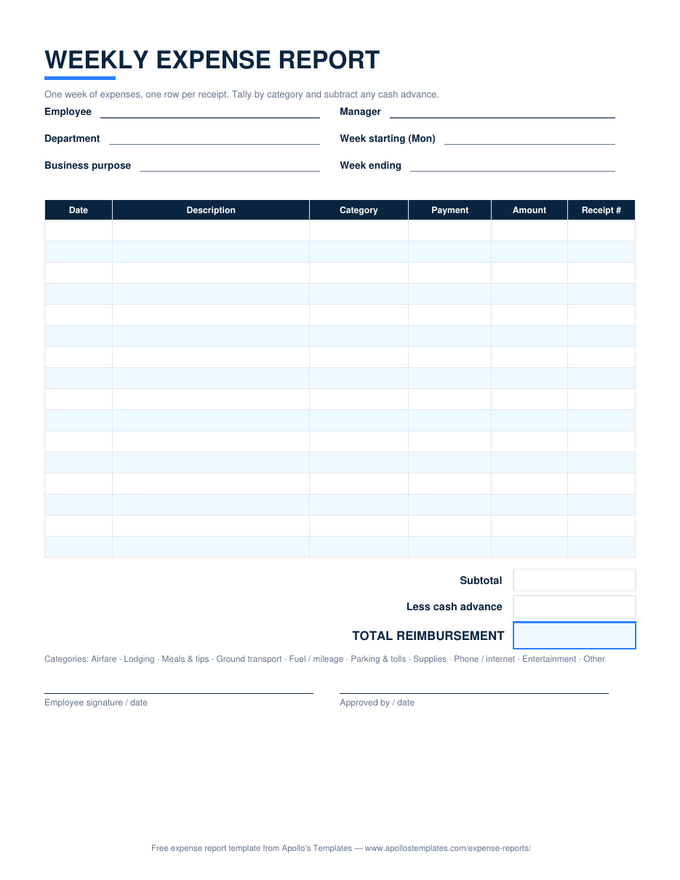
Week-start date fills the header; fifteen receipt rows with category and payment dropdowns; SUMIF category summary; subtotal, less advance, total reimbursement.
Weekly expense report with a self-dating week header, one row per receipt with category and payment method, a category summary, and the reimbursement total
PDF

Printable PDF

The glovebox version — sixteen rows, the reimbursement stack, both signature lines.
Download PDF

Word (.docx)

Editable for teams that submit typed reports — add the company name, save it as the standard weekly form.
Worth knowing

Friday reports are how field teams stay reimbursed.

The single habit that separates people who get reimbursed promptly from people who eat expenses: a fixed submission day. Weekly reports filed every Friday become a rhythm the approver expects and the bookkeeper batches; irregular reports become conversations. Print a stack of the PDF for the truck, or keep the Excel open on the laptop and add rows as receipts arrive.

Photograph every receipt the moment it’s handed to you and name the photo with the date and amount. Attach them behind the printed report or in the same folder as the spreadsheet. A weekly report with its receipts is a two-minute approval; without them it’s a follow-up email, every time.

A month at a time
Monthly Expense Report
Thirty-one self-dating rows and a category summary for the whole month.
Open
A day at a time
Daily Expense Report
One day per page with a mileage line — the field-sales sheet.
Open
Keep the running log
Expense Tracker Template
Where spending gets logged between submissions.
Open

Frequently asked questions

Why submit expenses weekly instead of monthly?
Two reasons that show up in every accounting department's inbox. Receipts fade and get lost — a week-old stack is complete, a month-old one has gaps. And reimbursement lands on the next paycheck instead of six weeks after the spend, which matters to anyone fronting travel on a personal card. Employers like it too: weekly reports are small enough to actually review.
What's the difference between this and the monthly expense report?
Grain. The monthly sheet has 31 self-dating day rows and is built around calendar months; this one has a week header and receipt rows — you log each expense, not each day. Heavy spenders outgrow a month sheet's rows; light spenders find the weekly sheet mostly empty. Pick by volume: more than about three receipts a week, go weekly.
How do I handle a cash advance on a weekly report?
Enter it in the Less cash advance line and the total reimbursement subtracts it; if you spent less than the advance, the total goes negative — that's the amount you owe back. Most companies clear advances against the first weekly report after the trip; the sheet's math handles both directions.
Does the week have to start on Monday?
No — enter whichever date your workweek starts and the week-ending date computes six days later. Monday is the default because it matches most pay cycles, but a Sunday-start or a Wednesday-start report works identically; the receipt rows just carry their own dates.
Updated through September 2026