
Apollo's Templates
HomeBusinessExpense Report TemplatesMonthly
The whole month, one sheet

Monthly Expense Report Template

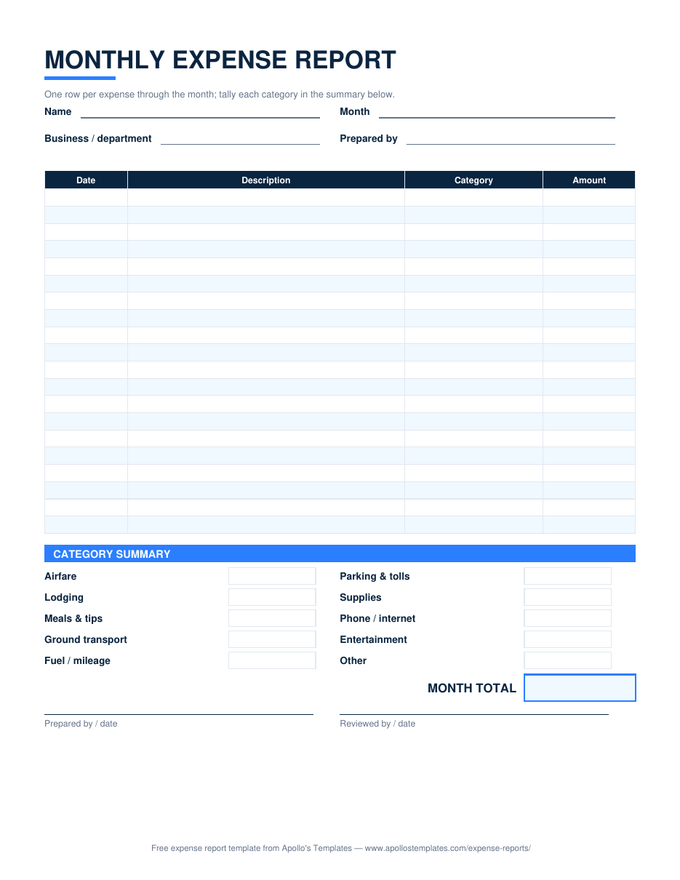
A month of business spending on a single page: thirty-one rows that date themselves once you enter the month's first date, a category dropdown on every row, and — the part that saves the real time — a category summary at the bottom that totals itself as you go. At month end the sheet already answers the bookkeeper's question: not just how much, but how much on what.

Three formats

The monthly sheet, however you keep books.
Worth knowing

The summary block is the report.

Row-by-row detail exists for the audit trail; nobody reads it at month end. What the bookkeeper actually transfers into the accounting system is the category summary — ten numbers instead of thirty — and what the owner actually reacts to is the same block (“why did Supplies triple?”). Getting those ten numbers computed automatically, from the same dropdown list the rows use, is what makes this sheet worth using over a blank spreadsheet.

One habit to steal: log the expense the day the receipt appears, not in a month-end batch. A monthly sheet that’s filled in as-you-go takes thirty seconds a day; the same sheet reconstructed on the 31st takes an evening and loses receipts.

Event-shaped spending
Travel Expense Report
One trip on one page — day rows and category columns instead of a month of line items.
Open
Money owed back now
Expense Reimbursement Form
The compact submission form for a one-off out-of-pocket expense that shouldn't wait for month end.
Open
Zero installs
Google Sheets Expense Templates
Make-a-copy versions of every sheet, with the SUMIF summary verified after conversion.
Browse

Frequently asked questions

How does the category summary calculate itself?
Every expense row has a category dropdown, and the summary block at the bottom runs a SUMIF against that column for each category — so the moment you log a $40 team lunch under Meals & tips, the Meals & tips total updates. Because the dropdown and the summary read from the same list, a category can never be misspelled into its own orphan bucket. That live breakdown is the whole point of a monthly report: it answers “where did the money go?” without a second spreadsheet.
Can I change the expense categories?
Yes — two edits keep everything consistent. First change the category names in the summary block (the SUMIF formulas reference the label cell next to them, so retyping the label retargets the math). Then update the dropdown list: in Excel it's Data → Data Validation on the Category column; in Google Sheets, Data → Data validation. Keep the two lists identical and the summary keeps working. Ten categories fit the layout; most businesses use six.
Is this for business expenses or personal budgeting?
It's built as a business document — categories like Airfare and Ground transport, a Prepared by / Reviewed by signature pair, and the assumption that a bookkeeper reads it at month end. That said, nothing breaks if you point it at household spending; retype the categories and it's a clean personal money log. The main thing you'd be ignoring is the review signature, which for personal use is between you and your conscience.
When is monthly the right period — versus per-trip or per-submission?
Monthly fits expenses that recur without a defining event: the owner's or salesperson's ongoing costs, a department's supplies, anyone who'd otherwise submit four tiny reports a month. One trip with a start and end date reads better on the travel report, where days are rows and categories are columns. And a one-off purchase someone needs back quickly shouldn't wait for month end — that's the reimbursement form's job.
Updated through August 2026