
Apollo's Templates
HomeBusinessExpense Report TemplatesReimbursement Form
Route it for approval

Expense Reimbursement Form

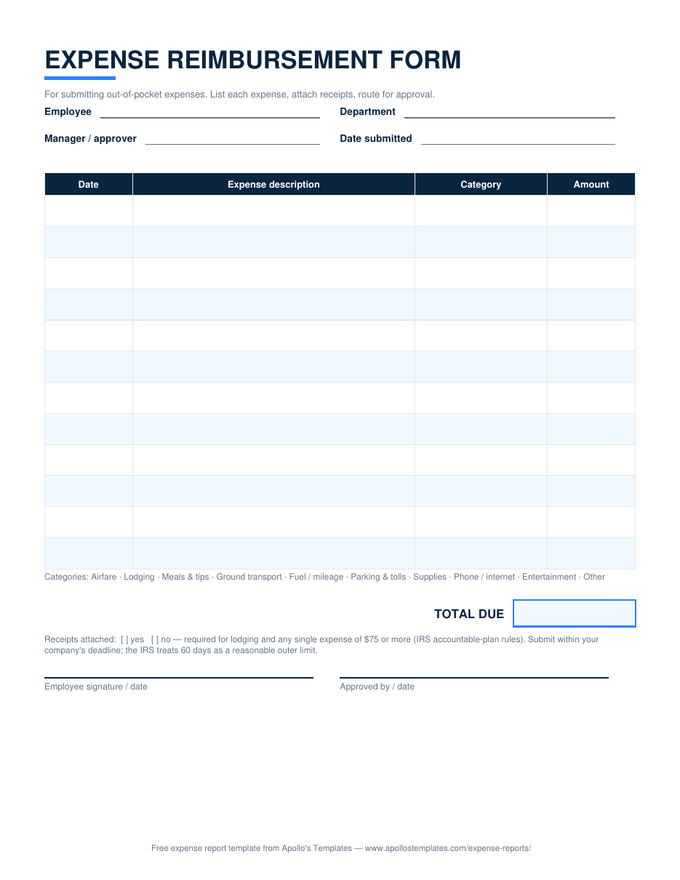
The short form for a simple situation: an employee paid for something out of pocket and needs it back. One screen — who's asking, who approves, the expenses with their receipts, a total, two signatures. The Excel version totals itself and validates categories from a dropdown; the PDF prints for offices that still route paper. Either way it carries the receipts checklist and the submission date, the two details that keep a reimbursement tax-free under IRS accountable-plan rules.

Three formats

The request form, paper or spreadsheet.
For the employer

A form is cheaper than a policy argument.

Most small businesses don’t need expense software; they need one agreed piece of paper. The moment reimbursements run through a standard form — same fields, same receipt rule, same approval line every time — the awkward conversations mostly disappear, because the form answers them in advance: yes, receipts; yes, a business purpose; yes, a manager signs before money moves.

The one policy decision to make deliberately: the submission window. Put a number on it (30 days is typical, 60 is the IRS safe-harbor ceiling), write it wherever you announce things, and enforce it kindly. An expense that surfaces a quarter late isn’t just an accounting nuisance — it’s potentially taxable wages, which makes late paperwork everyone’s problem.

Whole periods, not one-offs
Monthly Expense Report
Batch a month of expenses with a self-totaling category summary instead of filing forms one at a time.
Open
Paid with your car
Mileage Log
Business miles at the IRS standard rate — attach the log to this form and claim the total.
Open
Type it instead
Word Expense Templates
Every sheet in the library as an editable .docx for offices that live in Word.
Browse

Frequently asked questions

How is this different from the standard expense report?
Scope and urgency. The expense report is a period document — everything you spent over a stretch of time, often with a cash advance to reconcile. This form is a request document: “I paid for something out of pocket; please pay me back.” It's deliberately short — one screen, ten rows, no advance math — because the common case is one or two expenses that shouldn't wait for a month-end report. If you're filing more than a handful of these a month, graduate to the monthly report and batch them.
What makes a reimbursement request easy to approve?
Answering the approver's three questions before they ask: what was it for (a description that names the business purpose, not just the store), is there a receipt (attached, and the checkbox marked), and is the math right (the Excel version handles that). Submitting promptly matters more than people think — an approver signs off on last Tuesday's parking receipt without blinking, but a four-month-old restaurant bill invites questions nobody enjoys.
Is there a deadline for submitting expenses?
Your company sets its own — 30 days is common — but there's a tax deadline behind it: under IRS accountable-plan rules, expenses substantiated within 60 days of being incurred are automatically “reasonable.” Blow well past that and the reimbursement can be reclassified as taxable wages, which costs both you and the employer payroll tax. The form's Date submitted field exists precisely so that clock is visible on the document.
Do reimbursements show up on my W-2 or count as income?
Not when they're done right. Reimbursements under an accountable plan — documented business expenses, receipts where required, submitted in reasonable time, any excess advance returned — are not wages, don't appear on your W-2, and aren't taxed. Reimbursements that skip the documentation (a flat “expenses allowance,” or amounts paid without substantiation) are treated as ordinary taxable pay. The paperwork on this form isn't ritual; it's the thing that keeps the money tax-free.
Updated through August 2026