Apollo's Templates
HomeBusinessTimesheet TemplatesMonthly
A month at a glance

Monthly Timesheet Template

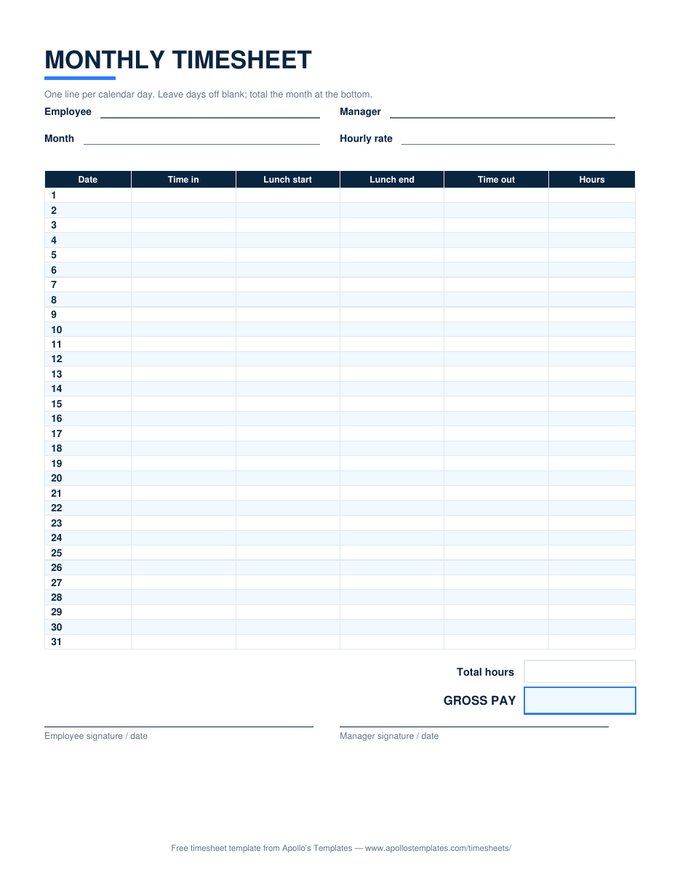
Thirty-one dated rows on a single page: in, lunch, out, and hours for every day of the month, with total hours and gross pay at the bottom. The Excel version dates every row from one typed start date — and quietly blanks the rows short months don't need. Best for salaried hour logs, contractor invoicing, and month-based reporting.

The month grid

Every day, one page.

When monthly fits

A summary document, not an overtime calculator.

The honest limitation, stated plainly: overtime is a weekly calculation, and a month grid crosses week boundaries, so this sheet deliberately doesn’t print an overtime column. What it does better than any weekly sheet is the month-shaped jobs — the hour log attached to a monthly invoice, the grant report that wants September’s hours, the “how many hours did we actually spend” question at month’s end.

Plenty of teams run both: weekly sheets for payroll accuracy, this one as the monthly roll-up the bookkeeper actually files. At one page per month, a year of records is twelve sheets of paper.

For payroll & overtime
Weekly Timesheet
The 40-hour split lives here — one workweek per page with lunch columns.
Open
Task-level detail
Daily Timesheet
Per-task rows with break minutes and notes — the invoicing companion.
Open
Type, don't write
Timesheets for Word
The Word versions of every sheet, ready for your company header.
Browse

Frequently asked questions

Why doesn't the monthly sheet have an overtime column?
Because monthly overtime isn't a thing under federal law — overtime is earned past 40 hours in a workweek, and workweeks don't line up with calendar months. A month grid can't run that split honestly, so instead of printing a column that would compute a legally wrong number, this sheet totals hours and gross pay and leaves overtime to the sheets built for it. If your people work overtime, track the detail on the weekly or biweekly sheet and use this one as the month-level summary.
What happens in months shorter than 31 days?
In the Excel and Google Sheets versions, nothing you need to manage: each row checks whether its date still belongs to the month you entered, and rows past the month's end blank themselves out. Enter February 1st and rows 29–31 (or 30–31 in a leap year) show nothing, and the totals ignore them. On the printed PDF, just draw a line through the leftover rows — the classic paper solution.
Who is a monthly timesheet actually right for?
Three groups, mainly. Salaried or stipend workers who log hours for reporting rather than pay calculation — grant-funded roles, nonprofit staff, graduate assistants. Contractors and consultants who invoice once a month and want the hour log attached to the invoice. And anyone tracking billable or volunteer hours where the month, not the paycheck, is the natural reporting unit. For hourly payroll with overtime, the weekly and biweekly sheets are the better tools.
Can I use this sheet for invoicing clients?
That's one of its best uses. Fill the month, put your contracted rate in the rate field, and the gross-pay figure at the bottom is your invoice line: hours × rate, with the daily detail above as backup documentation clients rarely question. Export the Google Sheets copy as a PDF (File → Download → PDF) and attach it. For per-task detail within a single day — several projects, separate billing codes — the daily timesheet is the finer-grained companion.
Updated through August 2026