Apollo's Templates
HomeResumesUX Designer
UX designer resumes · Word & Google Docs

Free UX Designer Resume Templates

Free, ATS-friendly UX designer resume templates in Microsoft Word and Google Docs — and because a UX resume should demonstrate the craft, each one leads with a different on-discipline device: a case-study portfolio, a double-diamond process ribbon, a Figma artboard, and a research insight board. Across four roles — product designer, UX designer, UI/visual designer, and UX researcher — every template foregrounds what design hiring looks for: a portfolio link, your process, tools (Figma, Sketch), methods (research, prototyping, usability testing, design systems), and measurable impact. Whether you're breaking in with no experience, switching careers from a bootcamp, or going senior, pick the layout that matches your role and add your work.

The templates

Four UX roles, four distinct designs.

A case-study portfolio for product designers, a double-diamond process ribbon for UX designers, a Figma artboard for UI/visual designers, and an insight board for UX researchers. Every one opens in Word or Google Docs, holds on one page, and is built to be ATS-friendly — with your portfolio link, tools, and methods front and center.
Product Designer — Case Study
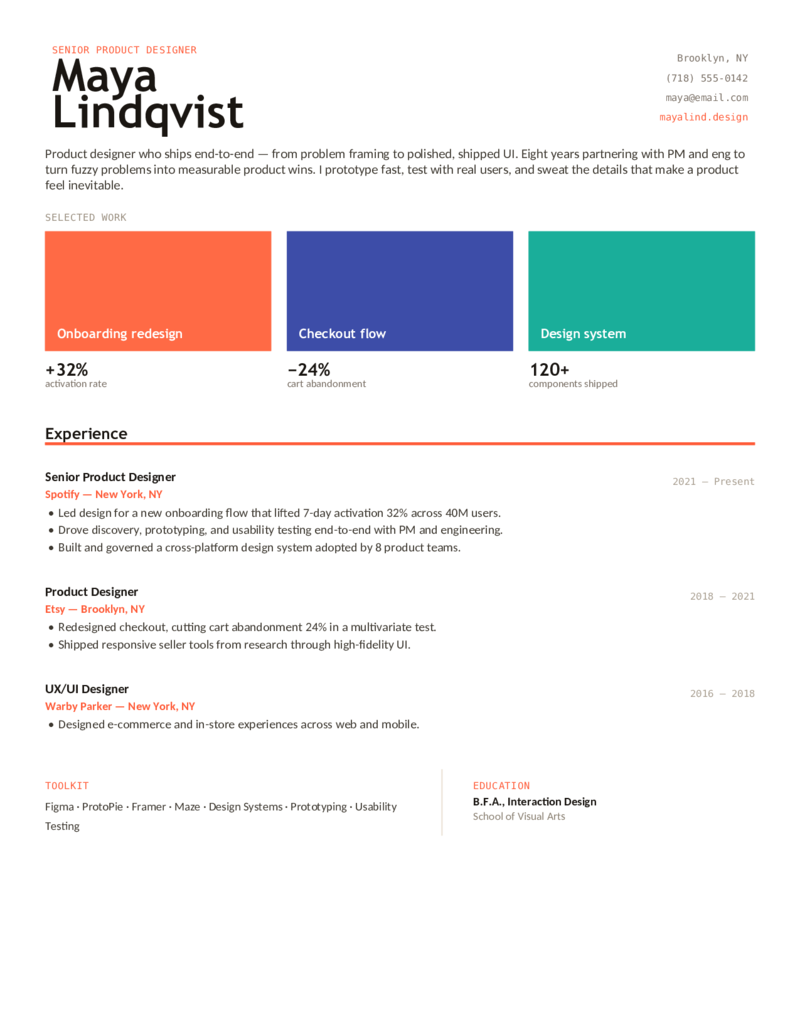
A case-study portfolio layout with selected-work cards and impact metrics (activation, abandonment, components shipped). For product designers who ship end-to-end — problem framing to polished UI — with a portfolio link in the header.
UX Designer — Process
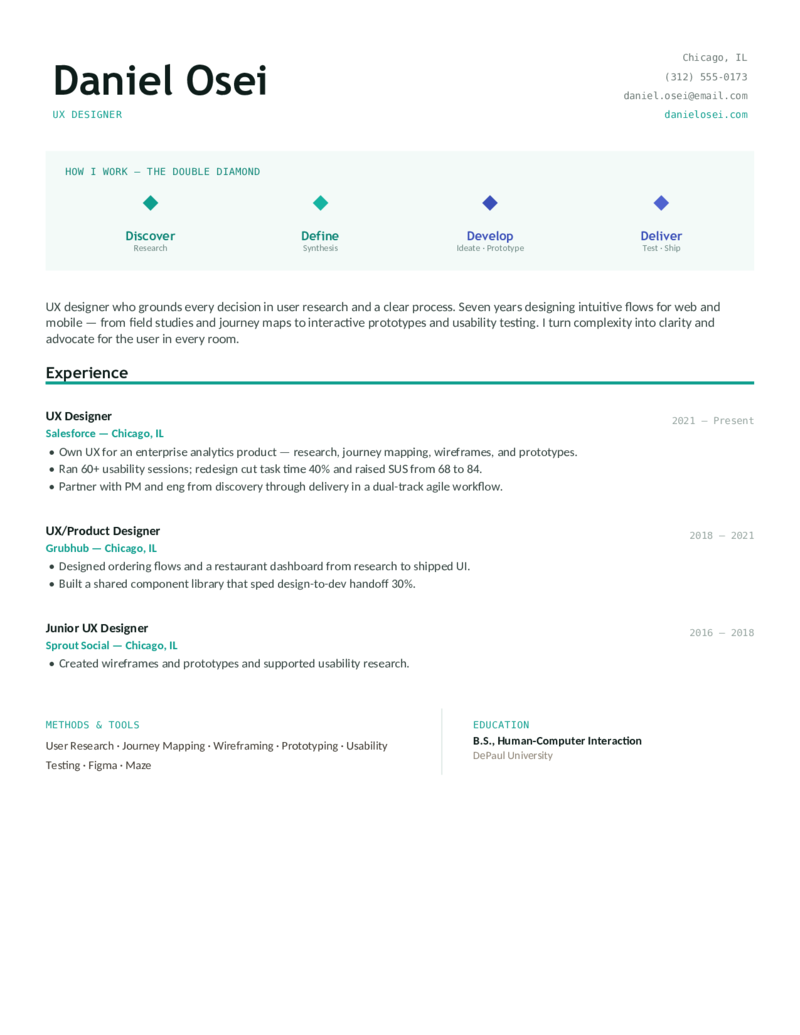
A double-diamond process ribbon as the hero (Discover → Define → Develop → Deliver). For UX designers who ground every decision in research and process — journey maps, wireframes, prototypes, and usability testing.
UI / Visual Designer — Artboard
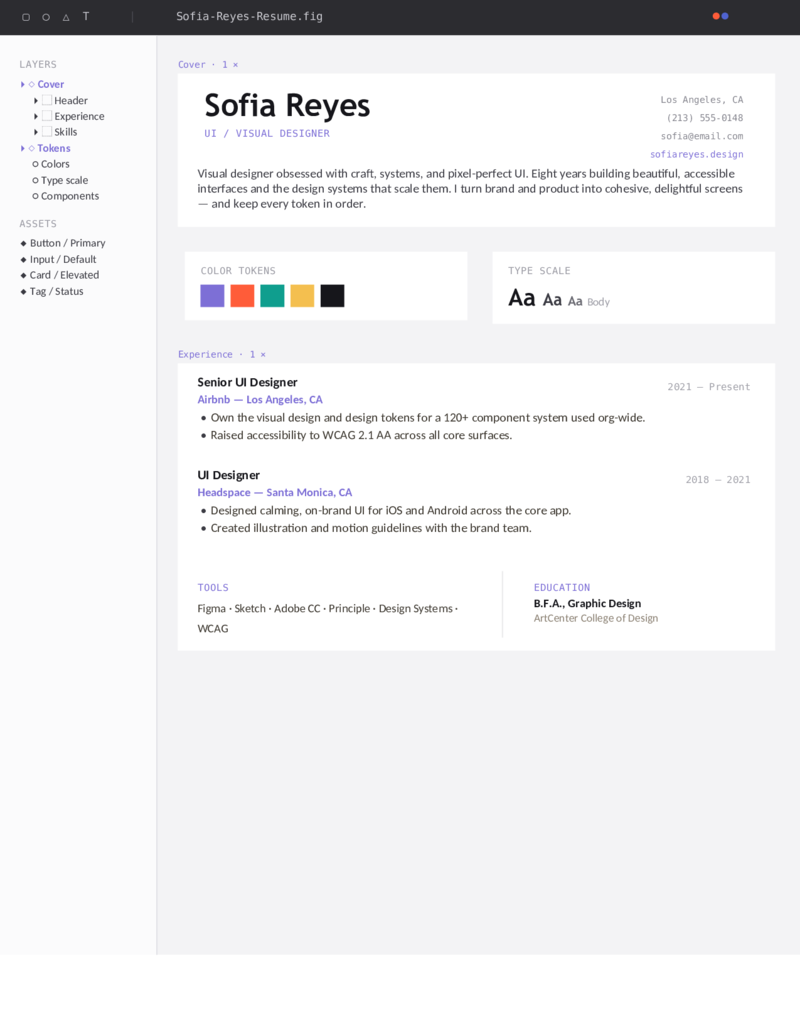
A Figma-artboard layout — toolbar, layers panel, color tokens, and a type scale. For UI and visual designers who live in the craft: design systems, accessible UI, and pixel-perfect components.
UX Researcher — Insight Board
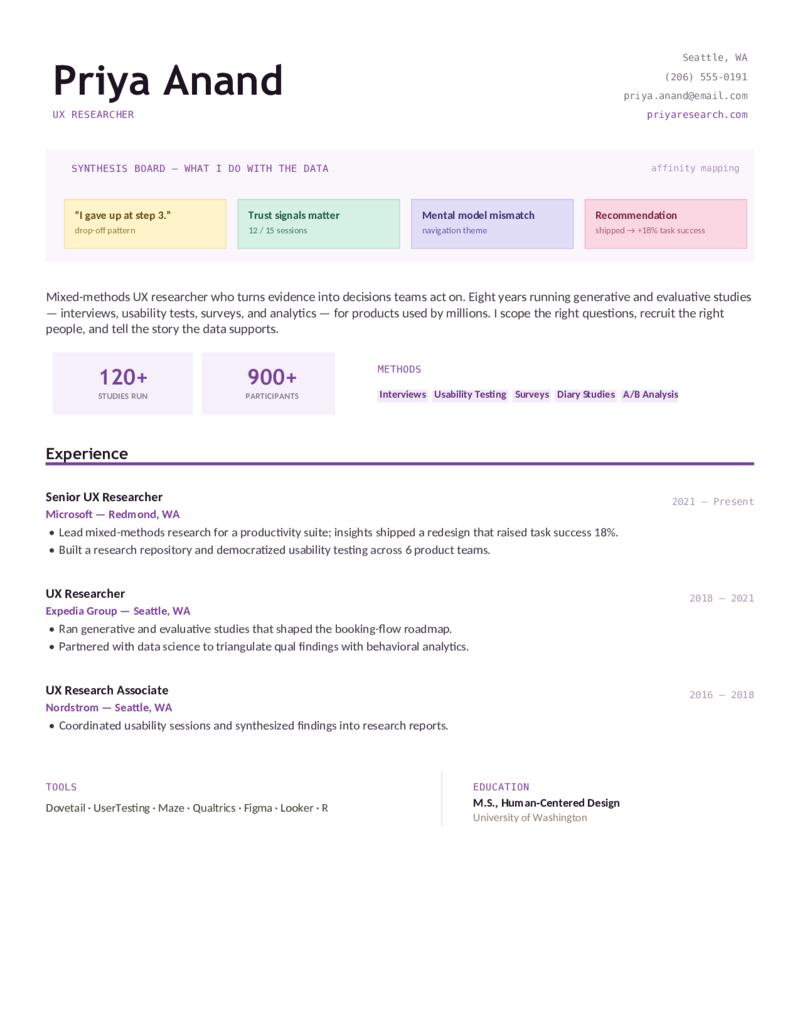
An affinity-mapping insight board with sticky-note findings, study stats, and a methods set. For UX researchers who turn evidence into decisions — interviews, usability tests, surveys, and synthesis.
What to include

What goes on a UX designer resume.

Design hiring screens on craft, process, and a portfolio. Put the things a design hiring manager and the ATS look for where they’ll be seen — which is exactly what these templates do:

  • Your portfolio link, up top. In the header next to your name — for UX it’s the most important link you have. Add a one-line descriptor and link individual case studies from your bullets.
  • Process & methods. User research, wireframing, prototyping, interaction design, usability testing, information architecture, and design systems — the vocabulary that proves you run an end-to-end process, not just push pixels.
  • Tools. Figma, Sketch, Adobe XD, Miro — and for research, Dovetail, UserTesting, and Maze. List what you can actually demonstrate in an interview.
  • Measurable impact. Tie work to outcomes — “redesigned onboarding, +32% activation,” “cut task time 40% and raised SUS to 84.” Numbers separate a designer from a portfolio of screens.

Which role? UX leads with research and process; UI/visual leads with systems and craft; product design adds strategy and ownership; research is interviews and synthesis. If your work is brand, print, and marketing visuals rather than product, see graphic designer instead.

Make it yours

Fill it in and apply.

  1. Click Open in Google Docs to copy it into your Drive, or Download Word for the .docx.
  2. Put your portfolio link in the header and swap the selected work and metrics for your own real outcomes.
  3. Mirror the job posting’s keywords exactly — Figma, usability testing, design systems, prototyping — so the ATS scores you.
  4. Keep it to one page; export a PDF to send and a Word copy for ATS portals.
Common questions

UX designer resume FAQ

How do I write a UX designer resume with no experience?
Lead with bootcamp capstones, coursework redesigns, freelance, and self-initiated case studies treated as real experience entries — each with a role, a process (research → wireframe → test), and an outcome. Put a skills section and your portfolio link near the top, since a strong portfolio matters more than years on the job for entry-level UX.
How do I write a UX resume when changing careers or coming from a bootcamp?
Open with a summary that frames transferable strengths (problem-solving, research, stakeholder communication) and name the bootcamp in a short education section. Use UX vocabulary deliberately — user research, usability testing, prototyping — and show one or two bootcamp projects as end-to-end case studies that prove process, not just visuals.
What's the difference between a UX designer, UI designer, product designer, and UX researcher resume?
UX designer resumes emphasize research, wireframing, interaction design, and usability testing; UI designer resumes lean visual/interface and design systems; product designer resumes add business strategy and end-to-end product ownership; UX researcher resumes foreground interviews, surveys, and data-driven insight. Tailor the summary and skills to the exact title in the job post — the underlying template is the same.
Where should I put my portfolio link on a UX resume?
Put it in the header next to your name and email, above or in place of LinkedIn — for UX, the portfolio is the most important link you have. Add a short descriptor ("Case studies: research, flows, usability results") and, ideally, link individual case studies from the relevant experience bullets.
What skills and tools should a UX designer list on a resume?
List tools (Figma, Sketch, Adobe XD, Miro) plus core methods: user research, wireframing, prototyping, interaction design, usability testing, information architecture, user flows, personas, and design systems. Only list what you can demonstrate in an interview, and attach skills to outcomes ("redesigned checkout in Figma, +22% task completion") rather than a flat list.
Are these UX designer resume templates ATS-friendly?
Yes — each template uses a single-column-friendly structure, standard headings, system-safe fonts, and no text-in-images, so applicant tracking systems parse it cleanly. Edit in Word or Google Docs, mirror the job post's UX keywords (Figma, usability testing, design systems), and export to PDF.

UX designer resume templates · Updated June 2026

Keep going

More resume templates.

Related
Graphic Designer Resumes
If your work is brand, identity, print, and marketing visuals rather than product UX, the graphic designer layouts foreground a visual portfolio and craft.
Open
Related
Software Engineer Resumes
If you build the product in code — front-end or full-stack — rather than designing it, the software engineer layouts fit better.
Open
Pair it
Cover Letter Templates
Add a short cover letter that points to your portfolio, frames your process, and names the product outcomes you're proudest of.
Open