Apollo's Templates
HomeBusinessTimesheet TemplatesMultiple Employee
One sheet, whole crew

Multiple Employee Timesheet Template

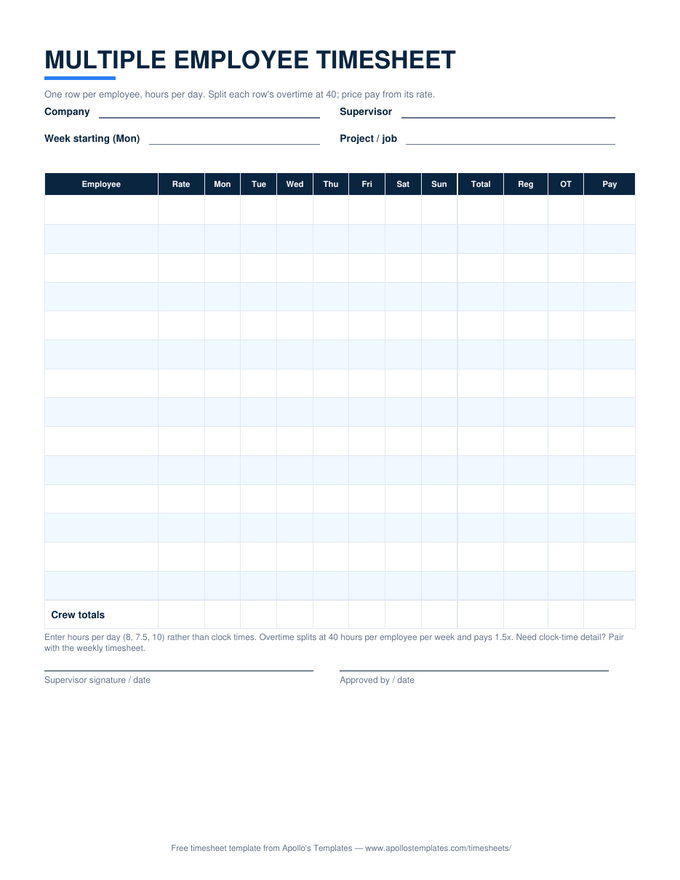
The crew sheet: one weekly row per employee, hours per day rather than clock times, and — the part shared sheets usually get wrong — overtime split at 40 hours per employee, never averaged across the crew. Each row prices pay from its own rate; the crew totals row sums hours and dollars for the week. Built for foremen, shift leads, and anyone running payroll for a dozen people off one page.

The crew sheet

One download, three formats.

Worth knowing

The crew sheet and the individual sheet are partners.

This sheet answers the supervisor’s question — who worked how much this week, and what does the crew cost. It deliberately doesn’t answer the auditor’s question, which is what time each person actually started and stopped. For most shops the crew sheet alone is plenty; the moment exact times matter — a wage dispute, a prevailing-wage project, night-shift differentials — put the person in question on the individual weekly sheet alongside it.

One habit that pays on shared sheets: the supervisor fills it in, and employees initial their own row at week’s end. The signature lines at the bottom cover the sheet as a whole, but a disputed row is a per-person problem — an initial next to the Friday total settles it before it starts.

For the exact-times cases
Weekly Timesheet
The individual sheet with clock times and lunch columns — pair it with the crew sheet when detail matters.
Open
Fill it from phones
Google Sheets Timesheets
The crew sheet as a shared Sheets copy — employees enter hours, the foreman watches totals build.
Open
All formats
Excel Timesheet Templates
Every sheet in the library as an .xlsx with working formulas.
Browse

Frequently asked questions

Why hours per day instead of clock in/out times?
Because that's how crew sheets survive contact with a job site. One supervisor recording in-and-out times for a dozen people produces ninety-six time entries a week; recording hours produces twelve small numbers a day, checkable at a glance. The convention costs some audit granularity — which is why the note on the sheet suggests pairing it with the individual weekly timesheet for anyone whose exact times matter (disputes, night differentials, prevailing-wage jobs).
How does overtime work when employees are on one shared sheet?
Per row, which is to say per person — the only legal way. Each employee's seven day-cells total into their own week, and that total splits at 40 hours into regular and overtime for that employee alone. One person at 42 hours earns 2 overtime hours even if the crew's average is 30; the crew totals row sums the results but never participates in the math. Averaging overtime across a crew is the multi-employee version of the averaging-across-weeks mistake, and the sheet's structure makes it impossible.
What if my crew is bigger than twelve people?
Use a second copy of the sheet — in Excel, duplicate the tab; on paper, print two and staple. We deliberately didn't cram twenty rows onto the page: crew sheets get filled in fast and read under bad light, and row height is what keeps them legible. Foremen with big crews usually split the sheet by crew or trade anyway (framing on one, finishing on another), which also makes the per-project labor cost fall out for free.
Can different employees have different pay rates on the same sheet?
Yes — that's why the rate travels with the row instead of sitting in the header. Each employee's Pay cell prices their own hours at their own rate, overtime at 1.5× of it, and the crew Pay total sums the actual dollars rather than assuming everyone earns the same. Leave the rate blank for anyone whose pay you'd rather not print on a shared clipboard; their hours still total, and only the Pay cell stays quiet.
Updated through August 2026