Apollo's Templates
HomeBudget TemplatesMonthly
The month on one page

Monthly Budget Template

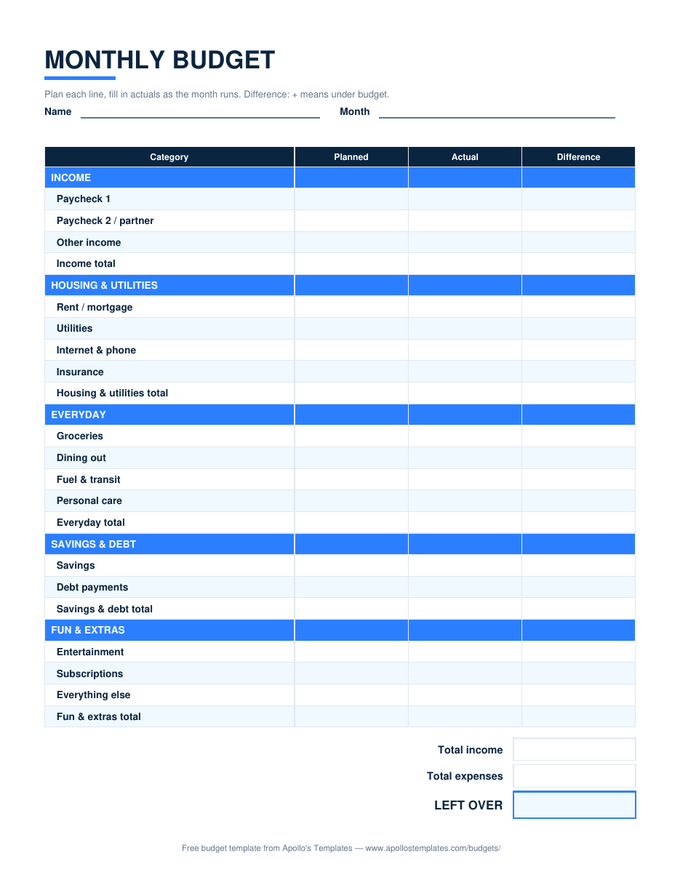
The general-purpose budget: income up top, expenses in groups \u2014 housing, transportation, food, savings, fun \u2014 and three columns that do the real work: Planned, Actual, and the Difference between them. The Excel and Google Sheets versions total every group, compute what's left over, and report your savings rate while you type; the PDF prints blank for people who budget with a pen. One page, one month, no signup.

The flagship sheet

One sheet, every format.

Excel — the math included

Plan each category, log actuals as the month runs — group totals, LEFT OVER, and your savings rate compute themselves.
Printable PDF preview
PDF

Printable PDF

The full grouped month with summary boxes at the bottom — the classic kitchen-table budget, sized for a pen.
Download PDF

Word / Google Docs

The same layout as an editable table — rename categories, add rows, keep a copy per month in one document.
Worth knowing

Plan from statements, not from hope.

The single most common budgeting failure isn’t overspending — it’s planning numbers that were never true. A $400 grocery plan against a $650 habit doesn’t save $250; it just guarantees the budget gets abandoned by the 20th. Before filling the Planned column, pull up last month’s bank statement and write what actually happened. The first honest month is diagnosis, not discipline.

Then let the Difference column do its quiet work. A category that runs negative three months straight isn’t a personal failing — it’s information: either the spending moves or the plan does. People who keep budgets long-term aren’t the ones with iron willpower; they’re the ones whose plan eventually matched their life closely enough to stop hurting.

Paid every two weeks?
Paycheck Budget
Plan each check as it lands — bill calendar and sinking funds included.
Open
Money evaporating?
Zero-Based Budget
The stricter cousin: every dollar gets a named job until zero remain.
Open
The whole household
Family Budget
Two-earner income block and kids' categories for the family meeting.
Open

Frequently asked questions

How do the Planned, Actual, and Difference columns work?
Planned is the month's intention, written before the month starts. Actual is what really happened, filled in as you go (or from statements at month end). Difference computes automatically: for expense rows it's planned minus actual, so a positive number means you came in under budget; for income rows it flips, so positive means extra income. The summary at the bottom runs the same comparison across the whole month — total income, total expenses, and LEFT OVER in both planned and actual versions.
What's a good savings rate?
The sheet computes it as your Savings & Debt group over total income, and the honest answer is: the one you can repeat. The 20% figure from the 50/30/20 rule is a solid target with an ordinary cost of living; high-rent cities and low-income seasons make 5–10% a real achievement, and dual-income households past their debt years often push 30% or more. The number matters less than the direction — a rate you can see is a rate you can grow.
Can I change the categories and groups?
Freely — nothing is locked. Rename any row to match your life (swap 'Personal care' for 'Therapy', add a 'Baby' row), and the group totals keep working because they sum the rows between the headers. If you add rows in Excel or Sheets, insert them between existing category rows so the SUM ranges stretch automatically — insert-below-the-last-row is the one move that needs a formula touch-up.
Should I budget gross or take-home income?
Take-home — the number that actually lands in your account. Taxes, insurance premiums, and retirement contributions withheld from your paycheck already happened before the money arrived, so budgeting gross double-counts them. The one exception: if you want to see retirement contributions as part of your savings rate, add a row for them in Savings & Debt and use gross income up top — just do it consistently.
Updated through August 2026