Apollo's Templates
HomeTo-Do List TemplatesMaker
Type it, print it

To-Do List Maker

Make a printable to-do list in your browser: name it, pick a plain, cute, or bold look, switch on a Top 3 block, numbered rows, a priority column, or a notes column, type your tasks, and download a one-page PDF. Typed tasks fill the top rows; the rest of the page is blank lines \u2014 and every field stays editable in the PDF, so you can keep typing into it later. No account, no upload — the same layouts as our printable templates, with your list already on them.

The maker

Build the list, download the PDF.

1 · The list
2 · Tasks (leave rows blank for a blank line on the page)
No tasks typed yet — you'll get a blank list to fill in by hand.
The PDF’s fields stay editable — open it in Acrobat, Preview, Chrome or Edge to type into it later.
Prefer a spreadsheet?

The same lists as Excel or Google Sheets files.
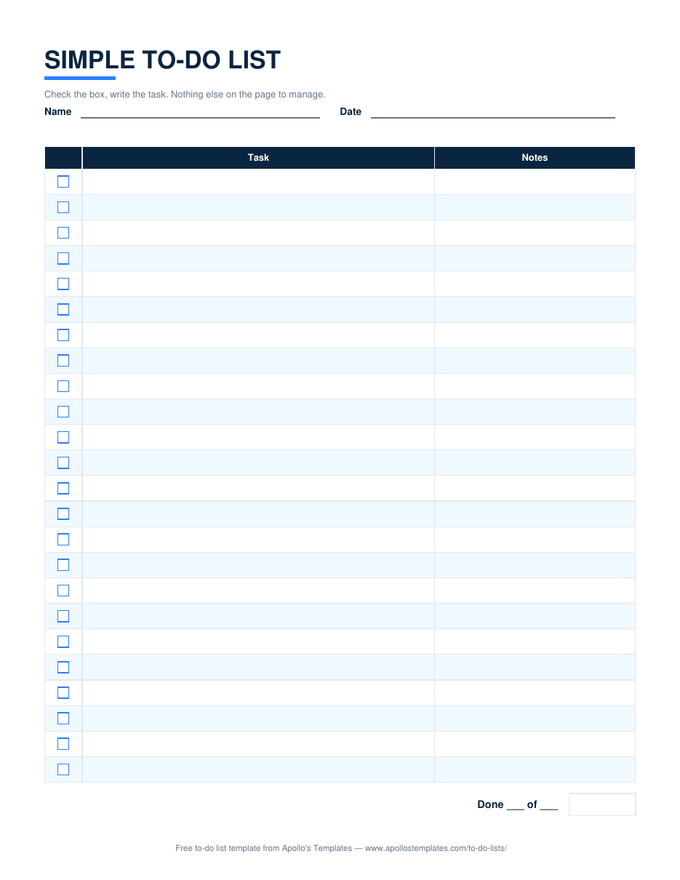
Simple To-Do List — Excel

The plain list as a spreadsheet: ✓ dropdown, done count, twenty-four rows.

Daily To-Do List — Excel

Top 3, the task list, an hourly column, and the Done today count.

To-Do List with Priority & Status — Excel

Dropdowns, overdue red, a percent complete — the reusable version of a prioritized list.
How the page is built

What the generated PDF includes.

A title in the look you chose, Name and Date lines, an optional Top 3 block with numbered lines, and a task table with a box per row — square in the plain and bold looks, a circle in the cute one — plus whichever of the numbered, priority, and notes columns you switched on. Your typed tasks fill the first rows; the table extends to the bottom of the page with blank rows, and a Done ___ of ___ line closes it.

It is deliberately one page and deliberately paper-first. For a list that counts itself as you tick, the Excel and Google Sheets templates above do that; the maker is for the list you want to print with the tasks already on it.

See finished lists
To-Do List Examples
Thirty-four filled-in samples, each linked to its template.
Browse
Which method?
How to Write a To-Do List
Top three, 1-3-5, Eisenhower, time blocking, the weekly review.
Open
Blank pads in three looks
Printable To-Do Lists
Twelve PDFs, ready to print.
Browse

Frequently asked questions

How does the to-do list generator work?
Name the list, pick one of three looks — plain navy, cute rose, or bold black and amber — choose whether you want a Top 3 block, numbered rows, a priority column, and a notes column, then type your tasks. Download builds a one-page PDF in your browser: your tasks fill the top rows and the rest of the page is blank lines to write on. Leave every task empty and you get a blank pad page in the look you chose.
Can I edit the PDF after I download it?
Yes. The title, name, date, Top 3 lines, and every task row — the check box, the task, the priority, and the notes cell — are real PDF form fields, pre-filled with what you typed. Open the file in Acrobat Reader, macOS Preview, Chrome, or Edge and click into any of them to change it, tick boxes as you finish, or fill the blank rows on screen. Print it and it behaves like any other list.
Is anything uploaded or saved?
No. The PDF is assembled by your browser with pdf-lib and saved straight to your downloads folder; there is no account and nothing you type leaves your device. Close the tab and it's gone — keep the PDF.
Can I get an Excel or Google Sheets version of what I make?
The generator makes printable PDFs. For a list that counts itself, download the matching template — the simple list, the daily list, or the full list with priority and status — as Excel or open it in Google Sheets; every template page links to them.
What is the difference between the three looks?
Same layout, different finish. Plain is the house navy with square boxes; cute is a rose palette with circles to fill; bold is black and amber with a heavy title, thick rules, and big boxes that read from across a room. Pick by where the page will live.
Why would I use this instead of a notes app?
For the page. A printed list is always in view, cannot send a notification, and gets crossed out with a pen. The generator exists so the page can carry your tasks already typed — a packing list, a shift list, the week's chores — instead of starting blank.
Updated through September 2026