Apollo's Templates
HomeBusinessExpense Report TemplatesStandard form
The standard form

Expense Report Form

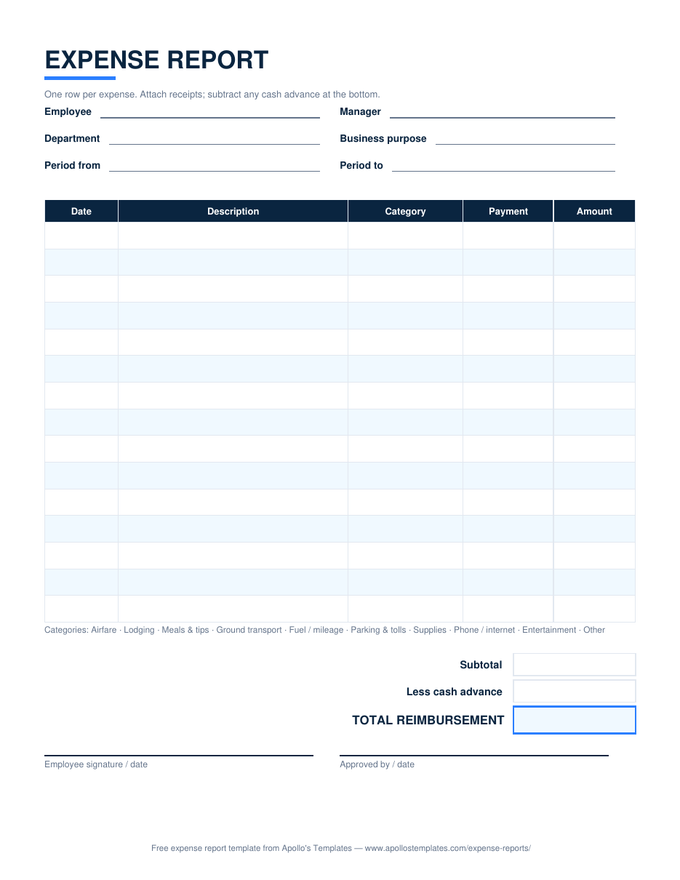
The general-purpose expense report \u2014 the form most companies mean when they say \u201cfill out an expense report.\u201d Eighteen rows with date, description, a category dropdown, and a payment-method column that separates company-card charges from personal money, then the subtotal, less cash advance, total reimbursement, and both approval signatures. Detailed enough for an audit, blank enough to fit any business.

Three formats

The standard form, three ways.

Excel — the detailed report that totals itself

Category and payment-method dropdowns on every row, subtotal, less cash advance, total reimbursement — the reference sheet the rest of the library is built from.
Standard expense report form with date, description, category, and payment method columns, a cash-advance line, and approval signatures
PDF

Blank printable form (PDF)

The blank expense report form for the clipboard — same columns, write-in totals, signature lines.
Download PDF

Word (.docx)

The form as an editable Word table — put your company name in the header and issue it as the standard.
Worth knowing

One standard form beats a dozen clever ones.

Companies that struggle with expense reporting usually have too many forms, not too few — a travel version, a sales version, someone’s improved version from 2019. A single detailed form everyone uses makes approval faster and posting mechanical, because the columns are always in the same place. Specialized sheets have their uses (travel grids, mileage logs, petty cash), but the standard form should be the default.

Issue it, don’t just offer it. The Word version exists so HR or finance can add the company name and policy line — the $75 receipt rule, the 30-day deadline — and hand out one document that answers the questions before they’re asked.

Fewer columns
Simple Expense Report
Date, description, category, amount, total — the short form.
Open
Card statement reconciliation
Credit Card Expense Report
Match every statement line and split business from personal.
Open
Fill it in the browser
Expense Report Generator
Type the rows and download a finished, signable PDF.
Start

Frequently asked questions

What makes this the “detailed” expense report?
The payment-method column and the per-row categories. Simpler forms list expenses and a total; this one records whether each expense went on the company card or came out of the employee's pocket — which is the difference between a reimbursement and a reconciliation — and categorizes every line so the bookkeeper can post it without reading the descriptions. That detail is what an accountable plan's substantiation rule is asking for.
Company card and personal expenses on the same form — how does reimbursement work?
The reimbursement total is the whole point of separating them: only personal-money rows are owed back to the employee, while company-card rows document spending that's already paid. In the Excel version, sort or filter by the Payment method column to see each subtotal; the credit card expense report is the dedicated sheet for reconciling card statements line by line.
Where does the cash advance line come in?
If the company advanced travel money, enter it and the total reimbursement subtracts it — a negative total means the employee owes the difference back. Most reports leave it blank; it's there so the same form serves the trip that was pre-funded without a second document.
Is this form enough for the IRS?
Under an accountable plan, expenses must be substantiated — amount, date, place, business purpose — and submitted within a reasonable time, with receipts for lodging and anything over $75. This form carries every one of those fields, plus the approval signature that documents the review. The receipts still have to be attached; the form is the index to them.
Updated through September 2026