

Apollo's Templates
Design the barriers out first

UDL Lesson Plan Template

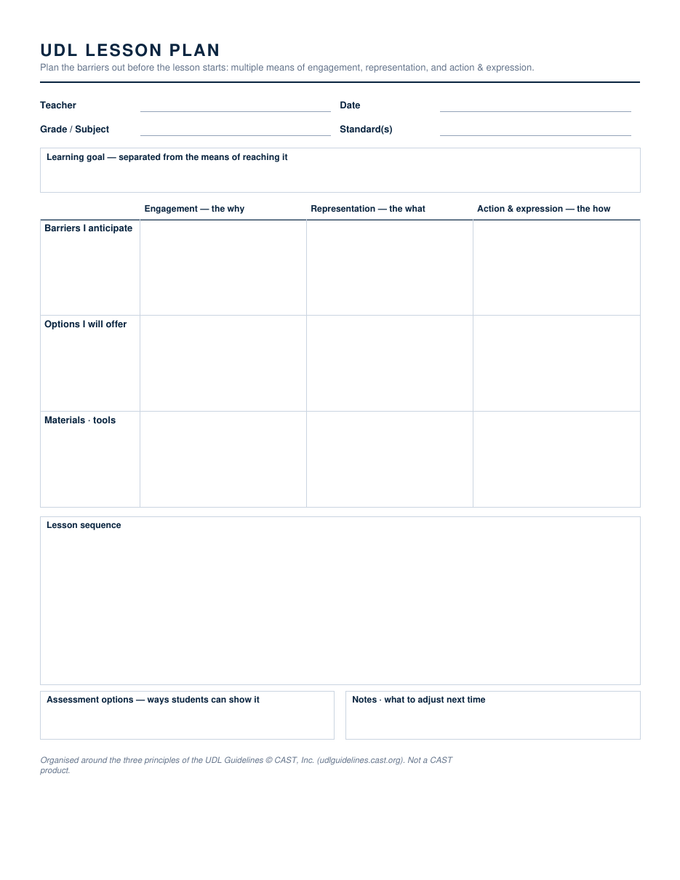
A three-by-three grid before the lesson sequence: the three UDL principles across the top, and for each one the barriers you anticipate, the options you will offer, and the materials that make the options real. Then the sequence, then assessment options.

Three principles, planned in advance

UDL lesson plan template

UDL Lesson Plan — Word & Google Docs

A three-by-three grid: engagement, representation and action & expression across; barriers, options and materials down. Then the sequence.
Portrait UDL lesson plan with a three-column grid for engagement, representation and action and expression, rows for barriers, options and materials, and a lesson sequence box
PDF

UDL Lesson Plan — fillable PDF

One page, portrait. Type into the fields or print it blank and handwrite.
Download fillable PDF

Specifications: US Letter, 8.5 × 11 inches. Word files are editable .docx that open in Word 2007 through Microsoft 365, including Word for Mac; the Google Docs link makes a copy in your own Drive; the PDF has real form fields and prints as plain hairline boxes when blank. Free to use in as many classes as you like, no account, no watermark.

Why it is laid out this way

About the udl template

Universal Design for Learning asks a planning question most templates skip: for this goal, where will students get stuck, and what choices can I build in before that happens? The grid makes that the first thing on the page. Engagement is the why — options for interest and persistence; representation is the what — options for perceiving and understanding; action and expression is the how — options for showing it. The learning goal sits above the grid, separated from the means, because that separation is the point.

The sheet is organized around the three principles of the UDL Guidelines, which are © CAST, Inc. It is not a CAST product and does not reproduce their checkpoints; the principle names are used descriptively, and the Guidelines themselves are at udlguidelines.cast.org.

Questions teachers ask

UDL lesson plans, answered

How is UDL different from differentiation?
Differentiation adjusts a lesson for particular students after the lesson is designed. UDL designs the options in from the start so fewer adjustments are needed. In practice you do both; this sheet puts the UDL thinking first and leaves a notes box for the adjustments that still come up.
Do I need an option in every cell?
No. Some lessons have no real barrier in one principle. An honest empty cell is better than a token option; the grid is there to make you look, not to make you fill.
Where do accommodations from an IEP go?
In the options row under the relevant principle — an IEP accommodation is usually an option you are required to provide. The special education template planned for the subjects set will carry them as their own field.

Drawn and measured in November 2026.

Nearby

Other lesson plan templates

A language objective beside every content objective
Multilingual Learner Lesson Plan Template
Multilingual learner lesson plan template
Open
The lesson an observer can follow
Evaluation-Ready Lesson Plan Template
Evaluation-ready lesson plan template
Open
Standard to exit ticket
Daily Lesson Plan Templates
2 daily lesson plan templates
Open
All lesson plan templates