Apollo's Templates
HomeBusinessTimesheet TemplatesProject
Hours by the job

Project Timesheet Template

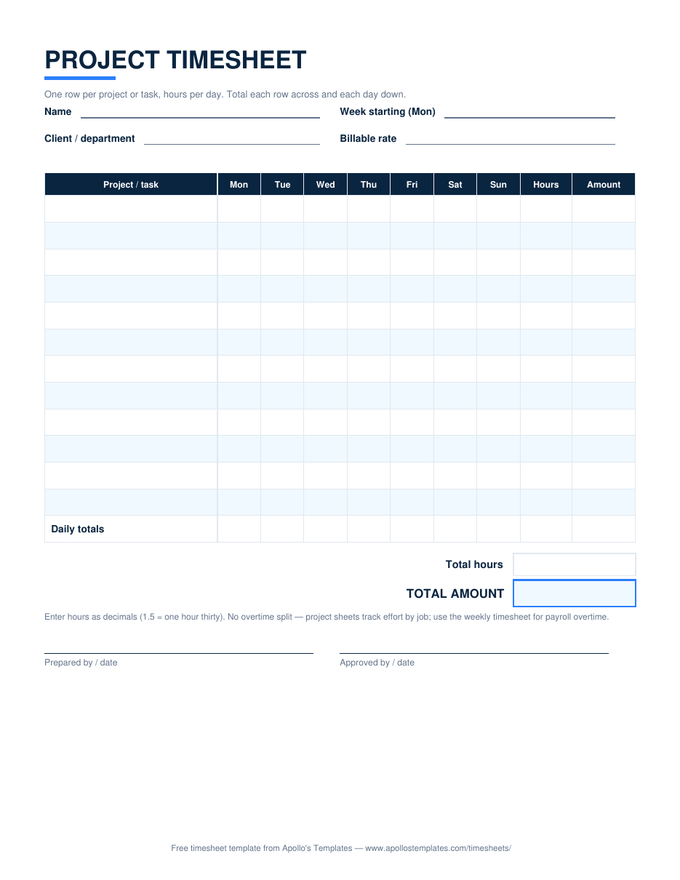
The timesheet that answers where the week went, not just how long it was: projects or tasks down the left, weekdays across the top, hours in the grid. Row totals show the week per job, the bottom row shows each day, and a billable rate turns the whole thing into money. Built for consultants, agencies, freelancers on several clients, and anyone doing job costing \u2014 it tracks effort by project, which is a different question than payroll.

Three formats

The job grid, three ways.

Excel — totals both ways

Ten task rows with decimal hours per weekday. Row totals, daily totals, and amounts at your rate all compute; the dated sub-header fills from the week-start date.
Project timesheet with one row per task, hours entered per weekday, and row and daily totals priced at a billable rate
PDF

Printable PDF

The wall-chart version: twelve task rows and a daily-totals row to tally by hand at the end of the day.
Download PDF

Word (.docx)

The grid as an editable table for typed weekly reports — paste it into a client update.
Worth knowing

Utilization is the number this sheet quietly produces.

Add up the billable rows and divide by the week total: that ratio — utilization — is the single most important number in any hours-for-money business, and a project timesheet computes it as a side effect. Consultants who track it discover that a “busy” 50-hour week was 26 billable hours, which is a pricing problem disguised as a time-management problem.

Fill the grid daily, not Friday. Reconstructed project hours drift toward whatever felt biggest, and the client whose work was invisible gets under-billed. Two minutes at the end of each day keeps the grid honest — and the weekly PDF export is a perfectly good status report to attach to an invoice.

Same hours, for payroll
Weekly Timesheet Template
The days-as-rows sheet with the 40-hour overtime split.
Open
Bill the hours
Hourly Invoice Template
Dated work sessions times rate — the project sheet's natural next step.
Open
One day, many tasks
Daily Timesheet Template
Per-task rows for a single day with break minutes.
Open

Frequently asked questions

How is a project timesheet different from a regular weekly timesheet?
Axis. A payroll timesheet's rows are days and its output is hours for the paycheck. A project timesheet's rows are jobs and its output is hours per job — the number a client invoice, a job-cost report, or a capacity plan needs. Most people who work on more than one thing need both: the weekly sheet says forty-two hours, the project sheet says eighteen of them were the Henderson site.
Why no overtime split on this sheet?
Because overtime is a payroll rule that applies to a person's total hours across the workweek, and this sheet slices by project instead. Computing overtime here would mean deciding which project the forty-first hour belonged to — an accounting fiction. Use the weekly or employee timesheet for pay; use this one to allocate the same hours across jobs.
Should I enter hours as decimals or minutes?
Decimals — 1.5 for an hour and a half, 0.25 for fifteen minutes. Every downstream use of project hours (invoicing, utilization, job costing) multiplies hours by a rate, and decimals multiply cleanly where minutes don't. Our timesheet calculator converts h:mm to decimals if you track by the clock.
How do I handle a task that spans two projects, or unbillable time?
Give unbillable work its own rows — “Internal / admin,” “Business development” — so the week still totals to real hours and utilization is honest. For genuinely shared work, split the hours between the two project rows by a fair estimate; what matters is that the daily-totals row still adds up to the day you actually worked.
Updated through September 2026