Apollo's Templates
HomeTo-Do List TemplatesDaily
One page, one day

Daily To-Do List Template

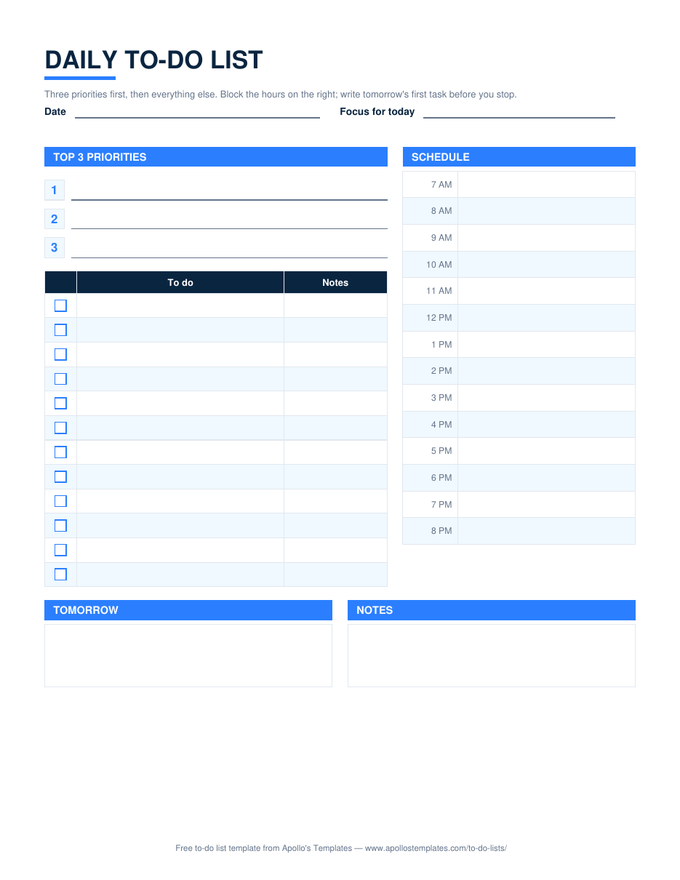
A day fits on one page when the page is built for it: three numbered lines for the things that must happen, a checkbox list for everything else, an hourly column from 7 AM to 8 PM to block the time, and a box for tomorrow's first task so you stop with a plan instead of a worry. Print it as a PDF pad, type it in Word or Google Docs, or use the Excel and Google Sheets versions, where the done count keeps itself.

Three formats

The daily list, three ways.

Excel — counts itself

Pick ✓ from the dropdown and finished tasks grey out; the Done today box reads 2 of 4 without you counting.
Daily to-do list with three numbered priority lines, a checkbox task list, an hourly schedule column from 7 AM to 8 PM, and tomorrow and notes boxes
PDF

Printable PDF

The pad version: top 3, twelve task lines, the hour column, tomorrow and notes boxes.
Download PDF

Word (.docx)

Editable tables with real ☐ boxes — type the day, print it, or keep one file per day.
Worth knowing

Write tomorrow's list tonight.

The most useful line on this page is the Tomorrow box. Filling it before you close the laptop takes ninety seconds and means the next morning starts with a decision already made. People who keep daily lists for years almost all do this; people who abandon them almost all started the day by trying to remember what mattered.

Keep the finished pages. A week of daily lists is the most honest record of where the time actually went, and it is the raw material for a better weekly list.

Seven days at a glance
Weekly To-Do List
One column per day, a box per task, and a count under each day.
Open
Clock first, tasks second
Daily Planner
The hour-by-hour version, with the to-do list in the sidebar.
Open
The short form
Simple To-Do List
Checkbox, task, notes. Nothing else to manage.
Open

Frequently asked questions

How is a daily to-do list different from a daily planner?
A planner is built around the clock; a to-do list is built around the tasks. This sheet keeps both but puts the tasks first: the top three and the checkbox list take the left two-thirds, and the hourly column on the right is there to reserve time for them, not to schedule the whole day. If you want the schedule to lead, the daily planner in the calendars section is the other way round.
Why only three priorities?
Because a list of eight priorities is a list, not a priority. Three is the number most people can actually finish alongside the interruptions a workday brings, and finishing them is what makes the list worth keeping. Everything else goes in the checkbox list below, where it can wait a day without guilt.
Can I use it for work and home on the same sheet?
Yes, and most people do. Put work tasks in the list and home errands in the notes column, or print two — the PDF is one page and the Excel version copies with a right-click on the tab. The Focus for today line at the top is the tie-breaker when both worlds want the same hour.
Does the Excel version work in Google Sheets?
Yes. The Open in Google Sheets button puts a copy in your Drive with the ✓ dropdown, the strike-through on finished tasks, and the Done today count all working — we import each sample after building it and read the computed cells back to check.
Updated through September 2026