Apollo's Templates
HomeTo-Do List TemplatesStudent
Assignments, by class

Student To-Do List Template

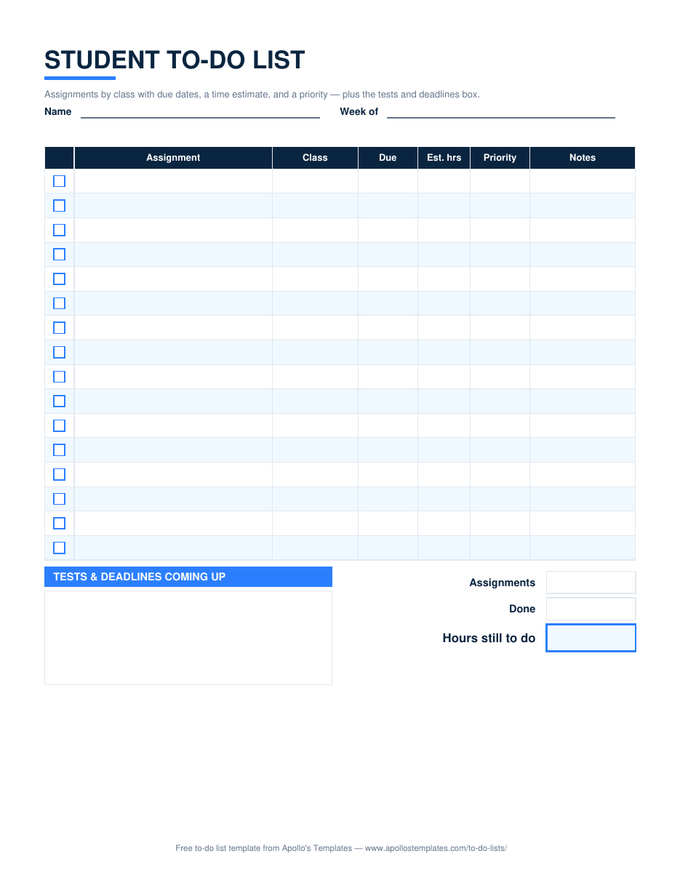
The homework list that answers the only question that matters on a Sunday night: how many hours are left? Each assignment gets a class, a due date, an estimated time, and a priority; the Excel and Google Sheets versions turn overdue rows red, count what is done, and add up the hours still to do. A box for tests and deadlines coming up sits beside the list so the exam on Friday is not a surprise on Thursday.

Three formats

The student list, three ways.

Excel — hours still to do

✓ column, priority dropdown, red overdue rows, and a total of the estimated hours on unticked assignments. Copies to Google Sheets for the phone.
Student to-do list with checkbox assignment rows showing class, due date, estimated hours, and priority, a tests-and-deadlines box, and an hours-still-to-do total
PDF

Printable PDF

The binder page: sixteen assignment rows and the tests box. Print one per week.
Download PDF

Word (.docx)

The list as a Word table for students who keep a running document per term.
Worth knowing

The list is for the week, not the night.

Homework lists fail when they are written at nine o’clock for a ten o’clock bedtime. Written on Sunday for the week — every assignment, every estimate — the same list shows that Tuesday is heavy and Wednesday is empty, and the studying moves before the panic does.

Tick things off as they finish, not at the end of the day. The falling hours total is the most motivating number on the page, and it only moves if you let it.

The teacher's side
Teacher To-Do List
Before, during, and after the bell.
Open
Hour by hour
Hourly To-Do List
Half-hour blocks for a study day.
Open
Younger kids
Kids' To-Do List
Big boxes, stars, a reward line.
Open

Frequently asked questions

What is the estimated-hours column for?
Realism. A list of nine assignments looks the same whether it is three hours of work or thirteen, and students consistently guess low. Writing an estimate per row and letting the sheet total the unticked ones turns the list into a schedule question: where do fourteen hours fit this week?
Does this work for college as well as high school?
Yes — the columns are the same, the assignments are just bigger. College students tend to keep one Excel tab per week and use the Priority column for the deadline that moves the grade. The tests-and-deadlines box holds midterm dates and paper due dates alike.
How should I use the priority column?
High for anything due this week or worth a lot of the grade, Medium for next week, Low for reading you can catch up on. Then sort by Due and work top-down; the red overdue highlight is the sheet telling you a Low item just became a High one.
Can a parent use this to keep track?
Share the Google Sheets copy and both of you see the same rows; the hours-still-to-do total is the number most worth looking at together on Sunday. For younger kids, the kids' to-do list with the reward box is the better tool.
Updated through September 2026