Apollo's Templates
HomeTo-Do List TemplatesWeekly planner
Tasks by day

Weekly Task Planner Template

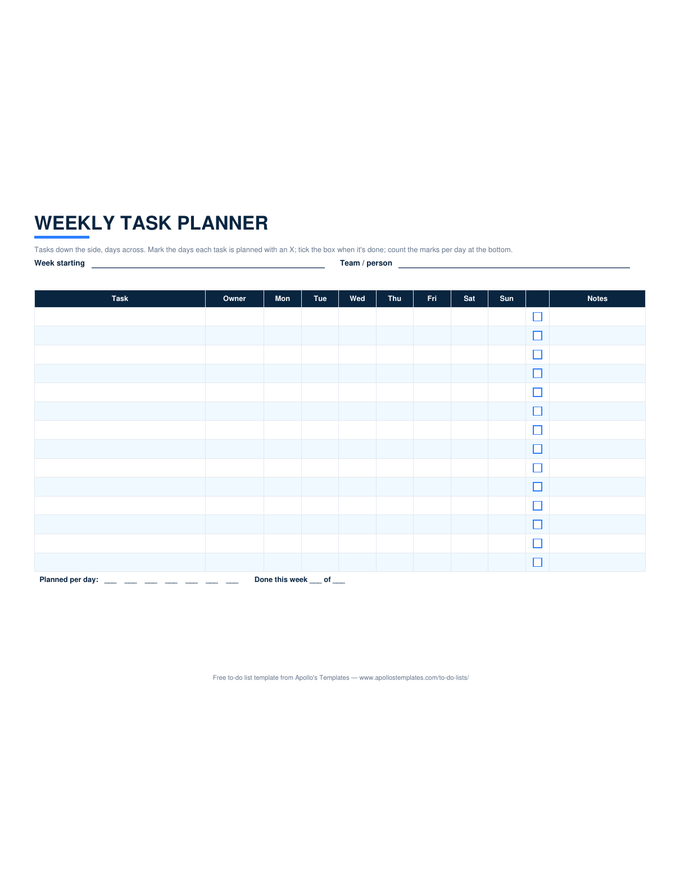
The weekly to-do list puts tasks under days; this planner puts days across tasks. Each row is a task with an owner, each column is a day of the week, and an X marks the days the task is planned for \u2014 so a three-day task shows as three marks and a Monday-only task as one. The headers date themselves from the week-start cell, the Planned row counts marks per day, and a \u2713 column tracks what actually finished. It is the small-team task calendar for the wall or the shared Sheet.

Three formats

The weekly task planner, three ways.

Excel — self-dating, counted

Type Monday's date; the seven headers update. Pick X from each day's dropdown; the Planned row counts per day; the ✓ column counts done for the week.
Weekly task planner in landscape with tasks down the side, seven day columns marked with an X where each task is planned, a done box, and planned-per-day counts
PDF

Printable PDF

The landscape grid for the office wall: write the dates, mark the days, tick the box.
Download PDF

Word (.docx)

The task-by-day grid as a landscape Word table for the team email.
Worth knowing

Mark the days before you commit the dates.

The planner’s value is that it makes overcommitment visible on a Monday morning instead of a Thursday afternoon. Lay every task across its days first, read the Planned row, and move marks until no day has more than the team can do. Only then send the dates to anyone outside the room.

Leave Friday light on purpose. Every week produces slippage, and a Friday with two marks absorbs it; a Friday with six turns into next week.

Days under tasks, the other way round
Weekly To-Do List
Seven day columns with a box per task.
Open
Hour blocks across the week
Weekly Planner
Time-blocked week with a to-do sidebar.
Open
Count down instead of across
Task Tracker
Days left per task and a dashboard.
Open

Frequently asked questions

Weekly task planner or weekly to-do list?
Ask which axis you think in. If you plan each day's list, the weekly to-do list (tasks under day columns) fits. If you plan each task's days — this report takes Tuesday and Wednesday, the site visit is Thursday — this planner fits, because a task can span several days and the Planned row shows how loaded each day is.
Is this a task calendar template?
For a week, yes: it is a task-by-day matrix, which is what most searches for a task calendar want once the month view proves too coarse. For a month-by-month task calendar, the monthly calendar templates in the calendars section give the date grid, and the monthly to-do list gives the dated task table.
How does the Planned row help?
It counts the X marks in each day column, so an overloaded day shows as a big number before the week starts. Move a mark right or left and the counts update. It is the simplest form of capacity planning that fits on one page.
Can a team share it?
In Google Sheets, share your copy and each owner marks their own rows; the Planned row totals everyone. The Owner column is there so a single sheet can hold a small team's week. For per-person accountability with acceptance, the task assignment sheet adds signatures.
Updated through September 2026