Apollo's Templates
HomeTo-Do List TemplatesCute
Pretty, and still useful

Cute To-Do List Template

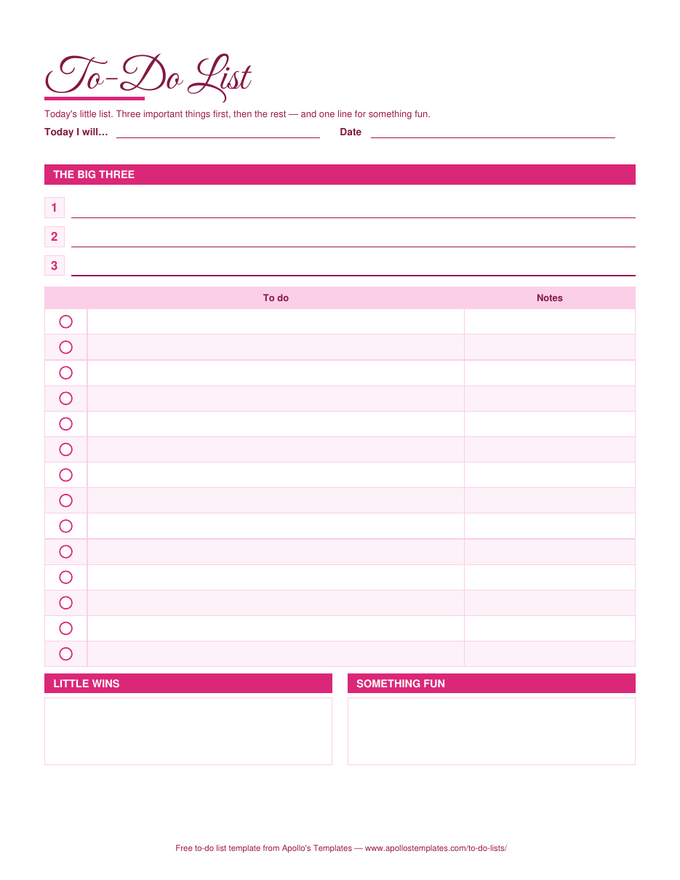
A to-do list you actually want on the desk: a rose palette, a script title, circles to fill instead of boxes to tick, three big lines for the day's Big Three, fourteen task lines, and two boxes at the bottom \u2014 Little wins, for the things that went right, and Something fun, so the day has one. It is a different design, not the plain list recolored, and it ships in every format: printable PDF, Word, Google Docs, and an Excel and Google Sheets version with the done count in the same colors.

Three formats

The cute list, three ways.

Excel — rose palette, real count

The same warm colors in a spreadsheet: ✓ dropdown, finished tasks fade, and the count at the bottom cheers you on.
Cute to-do list in a rose palette with a script title, three big-three lines, circle check marks beside each task, and little-wins and something-fun boxes
PDF

Printable PDF

Script title, circle check marks, the Big Three, and the two boxes. Prints beautifully on plain paper.
Download PDF

Word (.docx)

The design as an editable Word document — the cute to-do list template in Word people keep asking for.
Worth knowing

Little wins are the reason the list gets used tomorrow.

A list that only records what is undone is a list that gets avoided. The Little wins box flips that: by the end of the day there is something written in it, even on a bad day, and the sheet becomes evidence of progress instead of a ledger of debt. It is a small design choice with an outsized effect on whether the habit survives the first hard week.

The Something fun line is the same idea from the other direction. A day with one deliberately good thing in it is easier to plan around, and the task list underneath tends to go better for it.

Blank, in three looks
Printable To-Do Lists
The cute look as a blank pad, next to plain and bold.
Browse
The same idea, daily
Daily To-Do List
Top 3, task list, and an hourly schedule in the plain look.
Open
All ten in Google Docs
Google Docs To-Do Lists
Make-a-copy versions of every list.
Browse

Frequently asked questions

What makes this one cute rather than just pink?
The structure changed with the colors. The plain list has a task table and a count; this one leads with the Big Three, uses circles instead of squares, and ends with Little wins and Something fun — boxes that exist because the people who want a pretty list usually also want it to be kind. The rose palette is the finish, not the design.
Is there a cute version in Word and Google Docs?
Yes, and it is the same layout — script-style title, rose headers, ☐ marks in the first column, the Big Three lines, and the two boxes. Google Docs opens the Word file's colors faithfully; the Open in Google Docs button puts a copy straight in your Drive.
Can I print it in black and white?
It holds up: the section bars print as mid-grey, the circles stay crisp, and the script title still reads. If you print a lot of them, the printable page has the blank cute look without the boxes, which uses less ink.
Will there be more designs?
Yes — this is the first of the pretty looks, and more are planned alongside seasonal and holiday lists. The blank printable already comes in three looks (plain, cute, and bold), so the other two are one click away on the printable page.
Updated through September 2026