Apollo's Templates
HomeTo-Do List TemplatesDaily task list
The workday, on one sheet

Daily Task List Template for Work

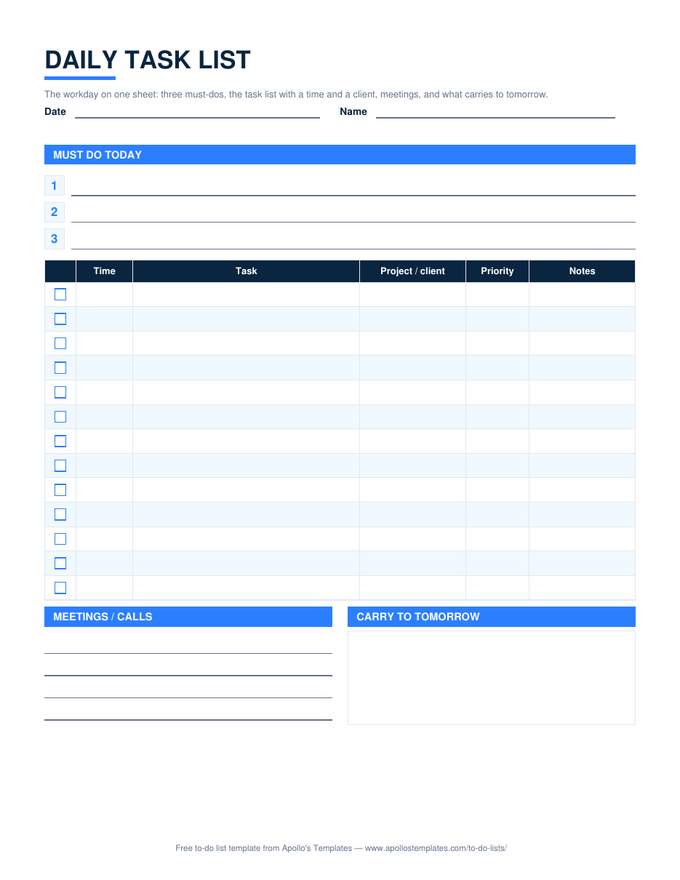
The daily to-do list is built around a person's day; this one is built around a working day. Three must-dos at the top, then a task table with a time, the project or client each task belongs to, and a priority \u2014 because at work a task without a client is a task nobody is paying for \u2014 a block for meetings and calls, and a box for what carries to tomorrow. The \u2713 column greys finished rows and the done count keeps itself in Excel and Google Sheets.

Three formats

The daily task list, three ways.

Excel — counts itself

✓ dropdown, priority dropdown, a project or client column, and a Done today count; keep one tab per day or clear it each morning.
Daily task list for work with three must-do lines, a checkbox task table with time, project or client, and priority, a meetings block, and a carry-to-tomorrow box
PDF

Printable PDF

The pad version: must-dos, the task table, meetings lines, and the carry-over box on one page.
Download PDF

Word (.docx)

The same layout as a Word table — print a pad for the desk or fill it in and save it by date.
Worth knowing

The carry-over box is the day's honest ending.

Every work day ends with something unfinished, and the difference between a calm tomorrow and a frantic one is whether that something was written down before you left. The box at the bottom right takes thirty seconds; it is the first thing to fill in tomorrow’s must-dos from, and it is the record that explains, when someone asks, why a task moved.

Three must-dos is a ceiling, not a target. On a day with four meetings, one must-do is realistic, and finishing it beats listing three and finishing none.

The personal version
Daily To-Do List
Top 3, task list, hourly schedule.
Open
Log it as it happens
Task Log
Date, requester, hours, completed.
Open
The hours behind the day
Daily Timesheet
Start, end, and hours per task.
Open

Frequently asked questions

How is this different from the daily to-do list?
Two columns and a box. The work version has a Time column, a Project or client column, and a meetings block instead of a blank hourly schedule; it drops the personal-day framing. If your day is mostly appointments, the daily planner is hour-first; if it is mostly tasks for clients, this is the one.
Why a project or client column?
Because it is the column that makes the sheet useful a week later. A day's tasks tagged by client add up to the timesheet, the invoice, and the answer to where the week went. Leave it blank on internal tasks and the pattern is still visible.
Can employees fill this in and hand it to a manager?
That is a common use — one page per person per day, the carry-to-tomorrow box being the part managers actually read. For the manager's own view across the team, the employee task list has the team dropdown and the by-employee summary.
Is there a Word version I can print as a pad?
Yes — the Word card is the same layout as an editable table; print twenty and keep them by the keyboard. The Google Docs copy is the same file in your Drive for people who type the day and save it by date.
Updated through September 2026