Apollo's Templates
HomeBusinessTimesheet TemplatesConstruction
Hours that land on the right job

Construction Timesheet Template

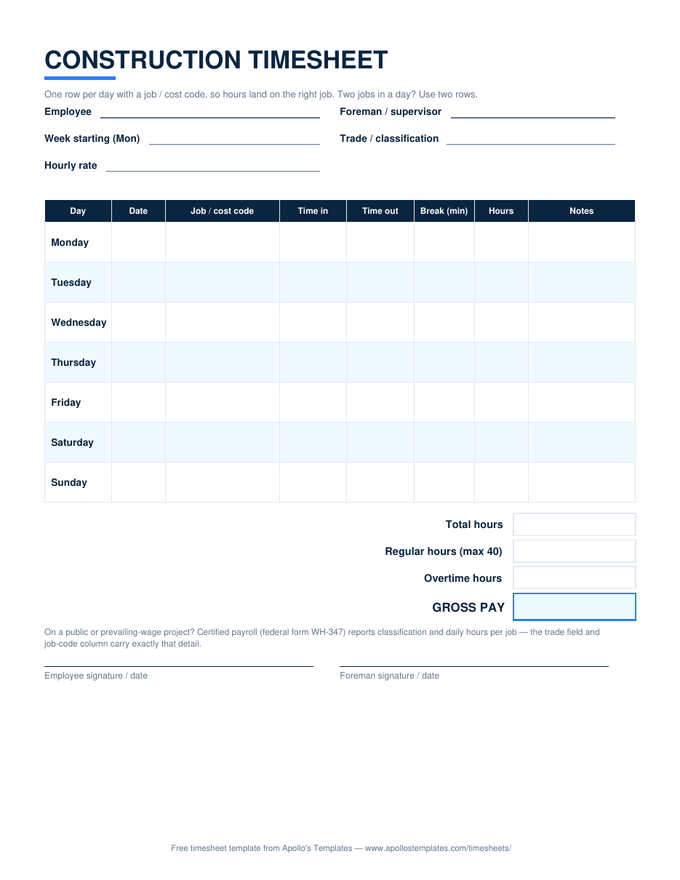
A job-site week, the way contractors actually need it recorded: one row per day with a job/cost code, times in and out, break minutes netted from the day's hours, and the weekly overtime split at 40. The trade/classification field and per-day, per-job detail are exactly what certified payroll gets built from — and what job costing quietly depends on. Rows are sized for a pencil in work gloves.

The job-site sheet

One download, three formats.

Worth knowing

The timesheet is where job costing starts — or dies.

Every contractor who’s lost money on a bid learns the same lesson: the estimate was fine, the labor tracking wasn’t. Job costing only works if hours land on the job that consumed them, daily, while everyone still remembers — which is a habit problem, not a software problem. A sheet in the gang box with a job-code column, filled in at the tailgate before anyone drives home, is the entire system. Weeks later, the estimate-versus-actual comparison either exists or it doesn’t.

For crews rather than individuals, pair this with the multiple-employee sheet— the foreman records the crew’s hours on one page while anyone needing per-job or per-time detail (prevailing wage, disputes, T&M billing) keeps this one.

Whole crew, one page
Multiple Employee Timesheet
The foreman's grid — every worker's week with per-person overtime and pay.
Open
Daily-overtime states
California Overtime Timesheet
Regular, 1.5×, and double-time split per day — required math on CA jobs.
Open
For the gang box
Printable Timesheets
The whole library as print-ready blank PDFs, this sheet included.
Browse

Frequently asked questions

Why does every row have a job / cost code?
Because in construction the question is never just how many hours — it's how many hours on which job. The code column is what lets Friday's sheet allocate labor to estimates, invoices, and job-cost reports instead of one undifferentiated pile. Use whatever coding your books already speak: job numbers, phase codes, customer names. Worked two jobs in one day? Two rows, same date — the day column can stay blank on the second, and the hours still total.
What does certified payroll need from a timesheet?
Public and federally funded projects require weekly certified payroll — federal form WH-347 — showing each worker's classification, the hours worked each day on that project, rate, and deductions. Nobody fills a WH-347 from memory; it gets built from daily records exactly shaped like this sheet: a trade/classification field, per-day hours, and a job code isolating the covered project's hours from everything else that week. This sheet isn't the WH-347, but it's the record the WH-347 is honestly built from. Form and instructions: dol.gov.
How should drive time and shop time be recorded?
As rows with their own codes — that's the clean answer. Time loading at the shop, hauling to the site, or moving between jobs is generally paid work time (the commute from home to the first site is generally not), and burying it inside a job's hours quietly distorts every job-cost number downstream. Most contractors give it a code like SHOP or TRAVEL. Truck drivers on construction crews live almost entirely in those rows, which is why this same sheet works as a driver's daily log for payroll purposes.
Does the overtime split handle prevailing-wage rates?
It handles the federal baseline: hours past 40 in the week pay 1.5× the rate you enter. Prevailing-wage jobs add wrinkles the sheet deliberately doesn't guess at — the OT premium is typically owed on the prevailing base rate, fringes may be paid in cash or benefits, and some states (California most famously) compute overtime daily. Enter the applicable base rate and let the sheet do the federal arithmetic; on a Davis-Bacon or state prevailing-wage job, payroll applies the project's wage determination on top. For California's daily rules, use our California overtime sheet.
Updated through August 2026